Ration: Claude usage in your menubar
I built a Mac menubar app called Ration to see my Claude Code usage. Get it here.
This is one of the things with coding agents, building small tools solving a small pain became increasingly easy. It’s also the situation where you are least likely to notice that you’re designing for one person. On one hand it’s cool that more people can build their own things, on the other hand personal tools have idiosyncrasies that make them fairly difficult for others.
I kinda hope Ration is a bit different, but it’s also good to be self aware.
What I actually wanted to know
My use case is simple. 95% of my Claude usage is via Claude Code CLI in a nice customized Ghostty. I have set up a statusline to track my session usage there, so I kinda know how I’m doing. It looks like this:
claude-usage-menubar | ctx:12% | 5h:28% | wk:56% -13% | Opus 5 · high
Actually when I started to work on this, I didn’t had the wk: pacing yet on my statusline, that came later, as a side effect of building Ration.
Also, I generally like having a subscription with limits, as they give me a good cadence of focused work with the agent, intertwined with focused work somewhere else. So having the limits has some energy and focus management value too.
But when I’ve run out of tokens, I don’t want the terminal kept open on my screen to see when it auto restarts, and also don’t want to open Claude all the time to check when it starts to time my coffee breaks correctly.
Also more importantly, if I do a busy start on Monday, sometimes my weekly session limit ran out by Friday, and I wanted some control over my pacing.
So I got the idea to build a small tool for this case: see how I’m doing compared to my week, get a signal if I’m over the pace, and see when my daily session is available again without opening up a new tool or page.
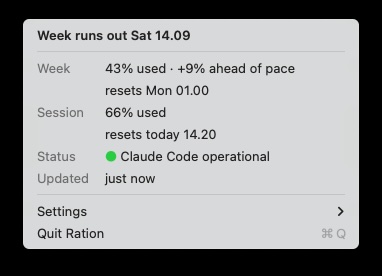
The whole app. The session windows, a service status, and how old the reading is.
Pacing is a subtraction
Pace was a nice little idea, take how much of the week you have spent, subtract how much of the week has passed, and you have your answer. Claude tells you when the weekly window ends, so the start is the end minus a week.
elapsed = (now - (resets_at - 604800)) / 604800 * 100
delta   = used_percentage - elapsed
The menubar shows the week rather than the session, since the statusline already covered the session while I was in there.
84% used is alarming on a Tuesday and unremarkable on a Sunday. The other menubar tools I looked at show you the weekly percentage, same as Claude usage on the web. If the delta is positive, I’m burning faster than the week is passing, so Ration extrapolates and tells me the day I’d run out: “Week runs out Sat 19.47.”
Making it work for me was quick aka Pareto
One point here is that it’s one thing to build something that you can use and runs on your computer. That takes like 20% of the time, together with making it a nice Mac menubar app that subtly helps and doesn’t look “overdesigned” with sloppy purple colors.
The rest of the 80% took to make it usable to others, get it covered with proper tests, set up a proper install sequence, iron out the small copy and design issues. Kinda the Pareto principle in action, but also gives a hint how far working prototypes can be from actual releasable code.
The copy part is a good example. The menu item for taking the app back out originally read “Remove Ration’s status line hook…”, which is super technical. It now reads “Undo Setup…”, which is something normal people would also understand. Standard UX polish but also shows how it’s not only people working on their stuff start to lose track how things behave outside, but agents can also get lost in their own context.
Getting things runnable on other people’s computers
This brought some “nice” issues, as in I would have never seen these if I would have not tried to make this app.
My favourite was the app reading its data once and then quietly stopping, because the function that checks a file’s modification date caches its answer (for better performance). It looked completely alive the whole time, since the countdown next to the number kept ticking off the system clock, while it had been showing me its launch-time reading for hours. Then there were my other Claude Code sessions. I had four open, some idle since before the weekly reset, and an idle session keeps rebroadcasting its expired numbers every ten seconds. So the app would fade out and announce that Claude Code had stopped, while three copies of it were writing to that file every five seconds.
The login item had a similar flavour. macOS identifies an app without a developer certificate by hashing the binary, so every rebuild orphaned it, and the checkbox stayed ticked while nothing launched. Distribution was the same kind of thing again. I planned to ship a Homebrew cask on the assumption that Homebrew strips the flag that makes Gatekeeper complain, and it turned out to do the opposite (thanks for checking this Claude). The solution was a formula that builds from source on your machine, which sidesteps the whole thing, since nothing downloads a binary so nothing gets flagged.
brew tap polgarp/tap
brew trust polgarp/tap
brew install ration
Probably I wouldn’t have caught these if I hadn’t tried to make things properly and deployable elsewhere.
Details also include things like choosing a name
Anthropic’s trademark guidelines require written permission for any use of their marks, so “Claude” something-something was out and so was using their orange. Which I didn’t want anyway. Going for Ration meant having a portion you are given for a period, which is more or less the product.
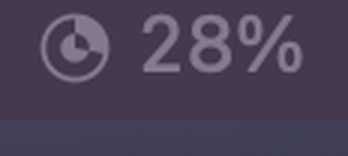
The disc fills as the week is spent, and the middle is punched out once I am over pace, so it stays nearly invisible when there is room and gets loud when there is not.
The fun in making something after all
Pacing probably didn’t need an app, the statusline was already there, and I just like to manage my focus by not having too many things on screen at the same time. The app adds a few things though, something visible when the terminal isn’t on screen, and a countdown for the moment you are locked out and Claude Code isn’t open to tell you anything.
And I wanted to make a Mac app, which is reason enough fur such a side project.